FREQUENTLY ASKED QUESTIONS
Reverse Sales Tax Questions
How do I calculate reverse sales tax?+
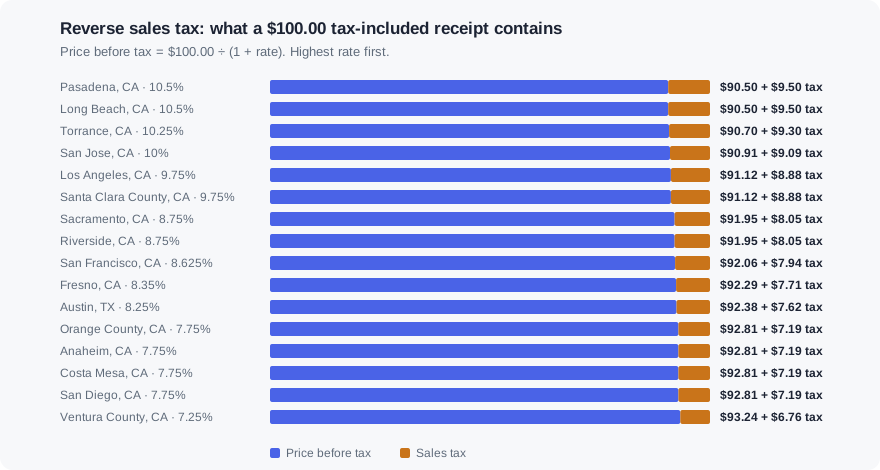
Divide the tax-included total by 1 plus the tax rate written as a decimal. At the 8.25% Austin rate, $108.25 ÷ 1.0825 = $100.00 before tax, so $8.25 of the total was sales tax.
What is the reverse sales tax formula?+
Price before tax = Total ÷ (1 + rate). Sales tax = Total − Price before tax, which is the same as Total × rate ÷ (1 + rate). Write the rate as a decimal, so 8.25% becomes 0.0825.
Why can't I just subtract the tax rate from the total?+
Because sales tax is a percentage of the price before tax, not of the total. Taking 8.25% off $108.25 gives $99.32, which is $0.68 too low. The gap grows with the rate and the size of the purchase.
How do I find the sales tax rate from a receipt?+
Divide the tax charged by the price before tax, then multiply by 100. If a receipt shows a $50.00 subtotal and $3.88 of tax, the rate is 3.88 ÷ 50 × 100 = 7.76%, which rounds to the 7.75% Orange County rate once you allow for cent rounding.
Why is my answer a cent off from the receipt?+
Registers round tax to the cent, sometimes per line and sometimes on the whole basket. Backing tax out of a rounded total can land a cent either side of the original price. That cent is rounding, not a different rate.
What if the receipt has taxable and tax-exempt items?+
Only reverse the taxable part. Most states exempt groceries and prescription drugs, so subtract the exempt items from the total first, back the tax out of what is left, then add the exempt items back to get the full pre-tax spend.
How do I reverse sales tax in Excel or Google Sheets?+
With the total in A2 and the rate as a percentage in B2, the price before tax is =ROUND(A2/(1+B2/100),2) and the tax is =A2-ROUND(A2/(1+B2/100),2). If B2 is already formatted as a percent, use =ROUND(A2/(1+B2),2).